


Page 11 - MFW March 2024
P. 11
The problem is that you have to program the code into the
                                                              Arduino. And you require a programmer to do this, plus a
                                                              bit of patience, sometimes, as Windows does not always
                                                              co-operate!
                                                              I won’t repeat how to do this, as it well covered at the
                                                              Mode-Zero and Single-Channel websites.

                                                              Phil  Greens  email  address  is  philg@talk21.com  The
                                                              software  code,  and  the  18  page  manual  for  the  DIY
                                                              Arduino encoder are here ;
                                                              https://mode-zero.uk/viewtopic.php?f=24&t=609

                                                              One problem you will soon note is that the 2 modules are
                                                              so small that there are no mounting holes, so, you must
    The transmitter is the DSMP DIY module at USD 28.30.   mount the modules on the plastic case using double-sided
    You will also need as many receivers as you wish, the 6   foam tape. The cheap stationary or hardware store stuff is
    channel one is  USD 12.90 and the 7 channel one is USD    no good, and will fall off in a few days. The correct tape to
    15.90.                                                    us is the incredibly sticky (and quite pricey) VHB black
                                                              tape by 3M, from Bunnings.  The packet holds much more
    One thing to note is that Lemon explicitly state you must   than you need, but it will also be superb for mounting
    NOT apply power to the transmitter module with the aerial   servos reliably.
    disconnected, otherwise damage will occur.  The 2.4 GHz
    antenna, take care the coax and connector are small and   Mike  has  written  an  excellent  18  page  manual  for  the
    a bit delicate.                                           Arduino encoder. And there are many user options for
                                                              setting it up. However it can be as simple as you like. But,
    A battery connector for a 2S LiPo battery, the small JST   please just spend some time carefully reading his manual!
    connectors are perfect.                                   And  needless  to  say,  you  need  a  very  small  iron,  fine
                                                              solder, a steady hand and a magnifying glass is a big help.
                                                              And then, with a little bit of care and luck, it will work that’s
                                                              when the fun starts. The encoder does offer left, right,
                                                              kick-up elevator and motor speed control, but, timing of
                                                              button pushes takes some practice, it gets easier after 15
                                                              hours mins of practice.  It goes like this....
                                                              •    Push the button and hold  gives Right
                                                              •    Two pushes  and hold gives Left
                                                              •    Three pushes and hold   gives kick-up elevator
                                                              •    Each “quick Blip” by itself cycles the motor speed
                                                                   through this sequence ...    fast / med / slow-off,
                                                                   then … fast / med ..... etc again.
                                                              •    As a safety matter, it’s required to hold the push-
                                                                   button down for 5 seconds to initially start the motor
                                                                   (It always starts up at full speed)

                                                              I very strongly suggest you start with the basics, say just
                                                              rudder and motor. There are many programming options,
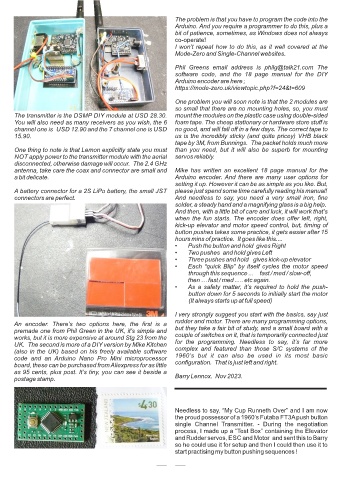
    An  encoder.  There’s  two  options  here,  the  first  is  a
    premade one from Phil Green in the UK, it’s simple and    but they take a fair bit of study, and a small board with a
    works, but it is more expensive at around Stg 23 from the   couple of switches on it, that is temporarily connected just
    UK.  The second is more of a DIY version by Mike Kitchen   for  the  programming.  Needless  to  say,  it’s  far  more
    (also in the UK) based on his freely available software   complex  and  featured  than  those  S/C  systems  of  the
    code  and  an  Arduino  Nano  Pro  Mini  microprocessor   1960’s  but  it  can  also  be  used  in  its  most  basic
    board, these can be purchased from Aliexpress for as little   configuration.  That is just left and right.
    as 95 cents, plus post. It’s tiny, you can see it beside a
    postage stamp.                                            Barry Lennox.  Nov 2023.


                                                              Needless to say, “My Cup Runneth Over” and I am now
                                                              the proud possessor of a 1960’s Futaba FT3A push button
                                                              single  Channel  Transmitter.  -  During  the  negotiation
                                                              process, I made up a “Test Box” containing the Elevator
                                                              and Rudder servos, ESC and Motor  and sent this to Barry
                                                              so he could use it for setup and then I could then use it to
                                                              start practising my button pushing sequences !

                                                           10

